
Parallel Map - Let's Explore the World3.2.1 - App Store
You'll be able to see results in few seconds.
Publisher Description
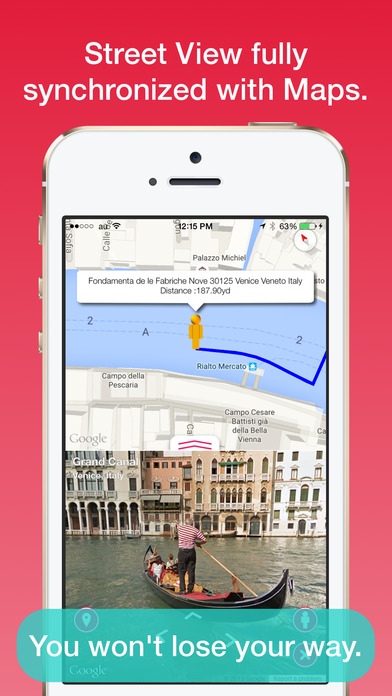
Street View fully synchronized with Maps.
Easy, just select a point.
More than 150 street view points.
You won't lose your way.
Street view
- Select a point from the World Famous Place.
- Walking your way and leaving your footprints history.
- Show Street View by long-tap on maps.
- Resume street view.
- Full screen street view support.
- iPad Split View, Slide Over support.
Fully synchronized with Maps
Street view fully synchronized with maps in parallel.
Save street view
You can just store the viewpoint (location, angle,footprint) of a street view showing now.
It is saved on iCloud, You can synchronize with a different device. You can save by default it to up to 5 points, but can unlock a limit by purchasing in this application.
Others
- Share Street View.
- Share Maps.
- Copy address.
- Open Google Maps App.
- Search title of point in Safari.
- Search street view by address or landmark.
- Display of current location.
- Layer(satellite, satellite + map, terrain).
- Distance is m(km) or mile.
- Traffic information.
- In-app purchase(Remove Ads)
Street View Points List:
U.K.
Big Ben, Tate Britain, National Gallery,
Westminster Abbey, Hyde Park,
Buckingham Palace,Abbey Road
St. James's Park, Greenwich Park,
Royal Observatory Greenwich,
River Thames Cruising, Piccadilly Circus,
Stonehenge
France
Triumphal arch, Eiffel Tower, Louvre,
Musee d'Orsay, Versailles palace,
Palace of Fontainebleau, Mont-Saint-Michel,
Ch teau de Chenonceau,
Ch teau de Chambord, Reims Cathedral
Italy
St. Peter's Basilica, Fontana di Trevi,
the Colosseum, Archaeological Areas of
Pompei, The Amphitheater of Pompeii,
Venice, Florence, Milan
Spain(Barcelona)
Sagrada Familia sanctuary, Park Guell,
Casa Mila, Casa Batll , Camp Nou, La Rambla,
Pla a Reial, Pla a de Sant Jaume,
Gothic Quarter, Pla a del Rei,
Barcelona Cathedral, Santa Maria del Pi,
Hospital de Sant Pau,
Museu Nacional d'Art de Catalunya
United States
Statue of Liberty, Brooklyn Bridge,
Empire State Building, Rockefeller Center,
High Line, Central Park,
Grand Canyon, Golden Gate Bridge,
Times Square, The White House,
New York Museum of Modern Art, Hawaii,
The Metropolitan Museum of Art, Las Vegas,
Devils Tower, Monument Valley,
Yosemite National Park
Australia
Great Barrier Reef
Japan
Mount Fuji, Gunkanjima, Yakushima,
Kaiyukan, Kyoto, Asakusa, Tokyo Tower,
Tokyo Skytree, Tokyo National Museum,
Asahiyama Zoo, Akiyoshi-do Cave,
Ogasawara Islands, Kumano Sankeido,
Osaka Castle, Great Seto Bridge,
Dotonbori, Yufuin
UAE
Burj Khalifa of Dubai
Nepal
Everest
Belgium
Grand Place
Netherlands
Van Gogh Museum, Rijksmuseum,
Royal Palaces Amsterdam
Mexico
Chichen Itza
Ecuador
Galapagos Islands
Brazil
Maracana stadium,
Amazon Rainforest, Amazon Rio Negro,
Christ The Redeemer, Iguazu Falls
Argentina
Aconcagua Summit
Singapore
Marina Bay Sands
Iceland
Cambodia
Angkor Wat and the surrounding ruins.
Egypt
Pyramids of Giza
Peru
Machu Picchu
Requires iOS 8.1 or later. Compatible with iPhone, iPad, and iPod touch.
About Parallel Map - Let's Explore the World
The company that develops Parallel Map - Let's Explore the World is Yoshihiko Eto. The latest version released by its developer is 3.2.1.
To install Parallel Map - Let's Explore the World on your iOS device, just click the green Continue To App button above to start the installation process. The app is listed on our website since 2013-09-13 and was downloaded 0 times. We have already checked if the download link is safe, however for your own protection we recommend that you scan the downloaded app with your antivirus. Your antivirus may detect the Parallel Map - Let's Explore the World as malware if the download link is broken.
How to install Parallel Map - Let's Explore the World on your iOS device:
- Click on the Continue To App button on our website. This will redirect you to the App Store.
- Once the Parallel Map - Let's Explore the World is shown in the iTunes listing of your iOS device, you can start its download and installation. Tap on the GET button to the right of the app to start downloading it.
- If you are not logged-in the iOS appstore app, you'll be prompted for your your Apple ID and/or password.
- After Parallel Map - Let's Explore the World is downloaded, you'll see an INSTALL button to the right. Tap on it to start the actual installation of the iOS app.
- Once installation is finished you can tap on the OPEN button to start it. Its icon will also be added to your device home screen.
Program Details
System requirements
Download information
Pricing
Version History
version 3.2.1
posted on 2013-09-13
Disclaimer
Official App Store Link
We do not host Parallel Map - Let's Explore the World on our servers. We did not scan it for viruses, adware, spyware or other type of malware. This app is hosted by Apple and passed their terms and conditions to be listed there. We recommend caution when installing it.
The App Store link for Parallel Map - Let's Explore the World is provided to you by apps112.com without any warranties, representations or guarantees of any kind, so access it at your own risk.
If you have questions regarding this particular app contact the publisher directly. For questions about the functionalities of apps112.com contact us.
